显示标签为“bmw icom a2 original”的博文。显示所有博文

2016年10月23日星期日

Icom a2 ISTA P V3.58 with BMW F10 programming solution

Have used2016 Ista P version 3.58 to do some programming on F10 but always got the error message:

”an error occurred on execution of the measure.
94201 technical service initialisation failed
-2 global unknown
63014 (castor) - error when executing a psdz function
63014 (castor) - error when executing a psdz function”
Ediabas 7.3.0 is installed correctly and patched. There is no problem with other cars like E series.

Windows Firewall is disabled and there is no other security software on that laptop.
ISTA/P works OK with other cars, so presume configuration is OK.

Reset a batteryon the vehicle. It is said that if F series sometimes gives this error, disconnecting the battery for 15 minutes usually solves the problem...but not worked for me also.

I installed the BMW software myself and I am not any expert on the matter, so it is possible I have copied some files into wrong directories.  I have two main folder on C: drive Rheingold with ISTA Diagnosis which works well. My SQliteDBs and PSdZ folders are in there. ISTA P is installed in a separate folder on C: drive . There is no PSdz subfolder in ISTA P.Then i copied data to the following directory:%:\ISTA-P\BMW\Services\data\ecudata...not worked too
Finally, i guessed it was related to the faulty ICOM A1. So i connected the different BMW Icom A2 emulator from a Chinese vendor: obd2france.com, the problem has gone ....

2016年9月8日星期四

(solved) ICOM A2 WLAN LAN led flash and not work

Customer complaints:
Using bmw icom a2 original with Rheingold 2015.10, but not good at neither wired connection or wireless (wifi) connection. The WLAN and LAN indicators flashes quickly. LAN led is lighted for 30 seconds and then connection is disabled after flash for a second...then continue to flash for 30 seconds...finally, stop working.


Solution from Diyobd2 technicians:
You don’t need to search IP;
Just setup wifi automatically
Reference: BMW ICOM A2 WiFi or Wired Connection Manual
*****Part 1 Wired connectionwhen ISTA-P programming
it's better to use Lan cable to connet to network instaed of wifi, for wifi is not stable sometime and cannot start programs ISTA-P (ISS-NEXT)
图片icom-wifi-wire-connection-1.jpg
how to connect to network via Lan cable?
method 1: PC - router - ICOM
connect PC to the router, then connect ICOM to router
method 2: ICOM - PC
directlt connect ICOM emulator to PC
*****Part 2 Wireless/WiFi connection when ISTA+ diagnostics
you can use wifi during diagnosis with ISTA+. but sometimes, the connetion will be cut off automatically and program prompts you to continue connection
Wlan settings
go to ICOM Configuration Manger, and select Wlan settings-> Security type:WPA2 personal. the password should be the same with that of router. then save data and unplug and re-plug the Lan cable to connect to icom. it is impossible to diagnose via wifi if password is not set
(NOTE: this is not for USB WiFi; USB wifi comes with password and router setup)
what to do if WIFI fails to connect?
go to VCI settings, then select "HO-ICOM/NET", NOT Ediabas
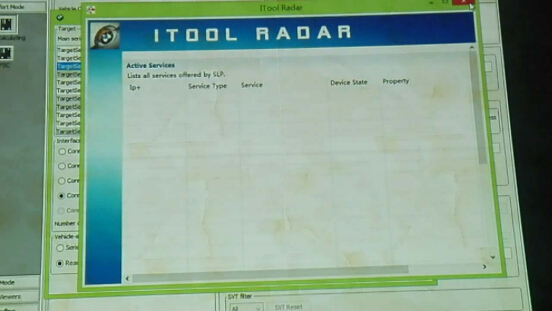
open Itool Radar to change ICOM IP address
find out IP address: 192.169.68.119
then go to "Confort Module" to change ip

2016年8月26日星期五

ICOM A2 INPA reset/calibrate steering angle on BMW F30

i'm retrofitting cruise control on a BMW F30 2005.
Changed the parts needed and added cruise control to the VO and coded the modules needed to code.
Next and last step is Resetting/Calibrating the steering angle sensor in INPA but it gives me the following message and nothing more happens:
Calibration steering angle only with steering wheel balancer !!
Okay this was actually really easy
1. Start by launching Toolset 32 / Tool32:
2. Choose "Load SGBD Group file"
3. Find your DSC module and click "open", (In my case for a E90 2005 F30 it was DSC_87.prg)
4. Scroll your way down to "lenkwinkel dsc abgleichen", ignition on and double click that.
Wait for the job to finish (took about 10 seconds for me)
DONE!
Steering Angle calibrated and VIN-matched to car.


Done!

2016年8月18日星期四

How to run BMW ICOM A2 with E-SYS?

It is possible use the bmw icom a2 francais to work in the e-sys??
Yes, just lock it with EasyConnect, obd_ab625 and then insert your ICOM IP in ESYS connection manager.
Here are the steps:
You have to lock/check the ICOM IP in ISTA-Dso E-Sys can use it. Therefore you need a tool like EasyConnect or iToolRadar. 
Connect the ICOM, turn the ignition on, start f.e. iToolradar. Now you can see the connection from the ICOM (normally on 169.154.92.38), mark it and click on reserve
(in EasyConnect is different but as easy as itoolradar).

Start E-Sys, choose the target (f.e. F010) and click on "connection ICOM/Ethernet". Type the IP address (here 169.254.92.38), the port is 50160, so the result should be tcp://169.254.92.38:50160.


Connect and have fun.
Note: TRY ON YOUR RISK. The instruction via pictures is kind of different that via words, especially ICOM IP setup. Both can be tried.
Feedback on ICOM connection to E-sys
My experience says that you need patience to use a icom diag head with e-sys, it's a 50/50 chance that it will work or not, or, something may not work. Last time I had a problem that I could code a lot of modules, except the BKOMBI module was uncodable (it gave a error on coding, don't know what type of error).

2016年8月11日星期四

Free download BMW INPA 5.00 VMware, EDIABAS 7.3.0

Here, free download BMW INPA 5.00 VMware, EDIABAS 7.3.0, NCS-Expert 4.0.1, WINKFP 5.3.1 for BMW coding and diagnosis.
Free download link:
(this is offered by a member at http://www.autoprofessionals.org/)
Version:
Inpa 5.00 VMware,
NCS-Expert V4.0.1,
EDIABAS 7.3.0,
WINKFP 5.3.1
Year / Release Date: 2012
Language: English + Russian
System requirements:
Minimum system requirements:
Windows® XP operating system;
Intel Pentium-III® 900 MHz or equivalent processor;
From 512MB of RAM;
From the 10GB of free hard disk space;
USB-port
Recommend:
VMware Workstation v 10.0.3
Windows 7 x64
Tablet:
Not required
Function:
Software for diagnosis and coding BMW
Vehicle list:
1 Series: E81 / E82 / E87 / E88
3 Series: E46 / E90 / E91 / E92 / E93
5 Series: E39 / E60 / E61
6 Series: E63 / E64
7 Series: E38 / E65
X series: X3-E83, X5-E53, X5-E70, X6-E71
Z Series: Z4-E85 / E86, Z5-E52
: MINI-R50 / R52 / R53 / R55 / R56 / R57
Extras. Info:
Works consistently K+DCAN USB cable, ICOM A2 emulator
used assembly of Feruma
Create profiles and file man
Updated databases for E65

2016年8月5日星期五

Differences between BMW ICOM A & ICOM A2 diagnostics (from users)

Greeting and feedback from BMW icom a and icom a2 users, in terms of differences (pros and cons) of icom a & icom a2 emulators.
there is no major benefit for a change from Interface A to Interface A2.
well, they use same software,so all the function is the same.
The different between icom a and icom a2 is the quality of hardware.
A2 interface just has a more ruggetized and streamlined case design. BMW ICOM A2 wifi with updated firmware works good (firmware: v1.38)
update file i used:
The modified ICOM A2 for vehicles with OBD access receives a significantly more powerful processor and more storage capacity. Robust aluminium case will help to avoid damage when using in harsh enviroments.
Because of the updated hardware, Icom a2 has a longer life than icom a. ICOM A may be able to use two of three years, but ICOM A2 at least be used over three years.
However, bmw Icom whether it the A or A2 can be used for many years as long as its well maintained and protected from being kicked around. Most Icoms break from abuse and being kicked around. Best bet is to use a obdii to obdii for connection to the obdii of the car and allow the Icom to pay flat to the ground.

2016年7月10日星期日

(Solved) Video module not visible in ICOM A2 NCS-Expert

I retrofited Videomodul Hybrid FBAS with to my BMW E91, and I think is working OK, just signal strenght is not so strong.

I'm using non OEM antennas (Ampire-ANT600) and heard that I need to code video module as "cabrio" and than it will send power signal to antenna amplifier.
But I have a problem, that I did not see any of VM kind module in NCS-expert.
I have pretty new daten 58. I can see that If I download full lenght trace file, there is some texts with antennas configuration,
but I just cant see and select module and LESSEN or CODIEREN.

But I can see VM in INPA and in Dr.Gini (VID_65_2) as well as I succesfully update firmware with WINkfp.

i modified the vehicle order to include the code for the video module and a have S601A in CAS/NFRM,
but theres few another in VO list like:
S602A ON-BOARD MONITOR WITHTV
S6UCA PREPARATION FOR TV FUNCTION
S750A TV/VIDEO (PAL)
S751A TV/VIDEO NTSC
S859A TV DECODING
S8S7A FLEET VEHICLE WITHOUT TV FUNCTION
SRK1A NAVI SYSTEM WITH TV/ON-BOARD MONITOR

Then i re-coded the CAS/FRM with the new FA - that was the solution
I changed FA from #0609 to #0911 an I can see and code TV now.

Product:

2016.3V Wifi ICOM A2+B+C Pour BMW Diagnostic & Programme Appareil Inclus Logiciel Français