显示标签为“carprog clone”的博文。显示所有博文

2016年8月10日星期三

Clone Carprog read MCU HC11E9 (wiring diagram)

Here are some user tips, which helps change km in dashboard 1999 Ford Focus, MCU HC11E9 (MaskSet: 4E28B) with clone Carprog v8.21.

Wiring diagram of Carprog clone A10 adapter:
- brown wire (GND) connect to pin 2,3 on MCU
- blue wire (RESET) connect to pin 17 on MCU

- green wire (comm to mpu RxD) connect to pin 20 on MCU
- yellow wire (comm from mpu TxD) connect to pin 21 on MCU
- 12v


Hope that this will help to others.


Ceci est du support technique du site Web www.obd2france.com: Clone Carprog read MCU HC11E9 (wiring diagram)

2016年7月22日星期五

Carprog 8.21 change km for Skoda Yeti 2012 with nec&24c64

Today, diyobd2 engineers managed to change mileage for Skoda Yeti 2012 with Carprog 8.21 clone. And here is the test report.
Tested with clone Carprog with V8.21 software at:
Model:
Skoda Yeti 2012
Dashboard:
nec&24c64
Miles before correction:
58112 km
Connection:
Process of odometer correction:
Run Carprog 8.21 program
Select DASHBOARD-> SKODA-> SKODA 2009-
  
Change KM
The current dashboard display
Connecting...
Reading..
Old value: 58112km
Input new value: 36102ml
Km display after change:
 
Luckily, Carprog v8.21 change km SUCCESS!
Note: Chinese Carprog is good at airbag reset, for other functions, luck is definitely necessary :D maybe because of firmware default

2016年7月21日星期四

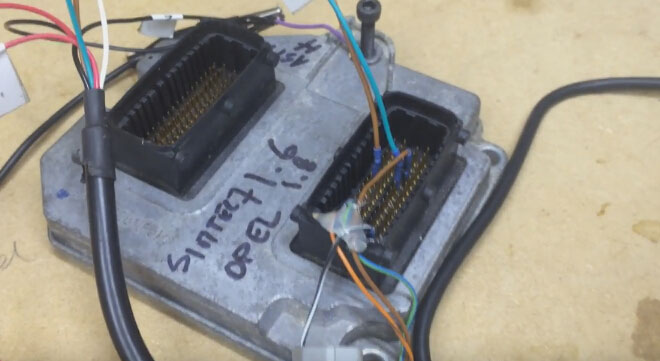
Carprog v8.21 100% read & write Opel CAN Siemens Simtec 71.6

Cool! Just succeed in reading and writing Opel CAN ECU Siemens Simtec 71.6 Advanced v0.7 with Carprog 8.21; i mean, i used this Carprog to change mileage. Share with you all.
My Carprog 8.21

The source (obd2france.com) is advised by a forum fellow. His has lots of experience on new update regarding mileage correction:
Focus 2008 ....ok
Cmax 2010 ....ok
opel many ecu(bensin and diesel) ....ok
Fiat croma, punto, bravo...ok
Passat b6 2007....ok
This is what i did...
Open Carprog v8.21 interface
Select ECU-> Opel CAN-> Siemens Simtec 71.6 Advanced v0.7

Make sure that Carprog and ECU is connected in a good condition


Then select Read EEPROM
Click OK


Connecting to ECU...
Reading EEPROM...
Reading 100%, Eeprom info

Change the mileage, then click Write EEPROM, OK to continue

Connecting to ECU...
Writing EEPROM...
Writing 100%

Yes. Change km success with carprog 8.21 online