What is New Genius?
New genius k-touch map is the world’s first Touch & Map device which allows reading / programming the ECU in modern vehicles over OBD2.It can work without connection a computer during the critical phases of reading and writing of the ECU.
New Genius OS (tested and working) and installation video demo:
New updates! obd2france.com engineer verified New Genius K-touch ECU programmer is working fine with both Win7 32bit and XP 32bit. And make two video demo, one is for win7 users ,and another is for old windows XP users, look at the following picture, the video is contained in the new genius DVD.
new genius Free download:
For xp: http://www.chinaautodiag.com/download/k-touch-xp-software.zip
For win7:
Firstly download http://www.chinaautodiag.com/download/k-touch-xp-software.zip
Then download application “raceloc.dll” which is used to solve the Fatal error.
http://www.chinaautodiag.com/download/raceloc.dll-for-win7-32bit.zip
How to install New Genius obd ii/boot master on Win7 / XP 32bit
Important installation tips:
1) Disable the network connection before setup k-touch.
2) Watch the video demo in the DVD especially the win7 users.
3) Ensure the k-touch driver complete setup; otherwise you may get other errors when you continue reading writing ECU data.
4) You do not need connect new genius to the computer when you read and write ECU data; just connect the device to the OBD port of Vehicle.
How to install K-touch on win7 32bit?
1) Open DVD, Install "wrar362".
2) Copy "K-touch software" folder and paste to the desktop.
3) Right click "DVD RW Drive (E:) K-touch, Eject it.
4) Install "setup 1".
Open "K-touch software" folder, select "setup1", select "fscommand" and then "Setup_RaceEVO" to install wizard, choose language (Language available: English, French, German, Italian, Portuguese (Brazil) and Spanish) , then go on complete updating your system.
Continue Race EVO (rev.431 build 829) setup 1- installAware Wizard.
Note: dimensione Sport Customer code is C7535
Go on till you finish the wizard for Race EVO (rev.431 build 829) setup 1 setup, remove the tick before “Run Race EVO (rev.431 build 829) setup 1 now”.
Delete "Race2000" on the desktop.
5) Install "Setup 2"
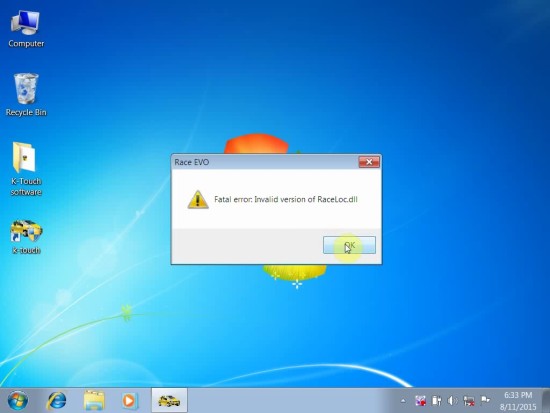
Install the extract file, after finish open the yellow icon “k-touch” on the desktop, you may come across an error message "Fatal error: Invalid version of RaceLoc.dll". Click "OK".
Generally speaking, the Fatal error working solution is: after completed setup, you need to manually replace raceloc.dll C:\Users\Your PC Name\AppData\Local\DimWare\RaceEVO\7.0.
Step-by-step to replace this file:
Open"K-touch software" folder, extract "setup3" and you will get the application file "RaceLoc.dll".
Go to C:\Users\Your PC Name\AppData\Local\DimWare\RaceEVO\7.0, find out "RaceLoc.dll" and delete it. (Note: \AppData\Local\DimWare\RaceEVO\7.0 may be hided, just click Organize- folder options - view and click the icon before “show hidden files, folders and drivers”.
Copy the "RaceLoc.dll" from the "setup3", and then replace the deleted "RaceLoc.dll".
6) Click the yellow icon "K-touch", agree the license, click "No" to connect network.
7) Plug new genius device into the computer by following this picture, for win7, the driver will automatically complete.
Go to Device Manager to check if you can see "DimSport - New Genius Device", yes means new genius build a good communication with your computer.
8) Read and write ECU data
Open the software, click "K-Touch"- "Explore", you will see New Genius hardware version is V5.005.0003.
Read ECU data: Click "Genius:/\File\Read\, firstly read “DF” then save it. Then "1015" and "12222" one by one.
Write ECU data: Click "Genius:/\File\Write, import file "DF", "1015" and "12222" one by one and write them.
How to install K-touch on win xp 32bit?
1) Install "setup 1".
2) Open folder "K-touch software" - "setup1" - "fscommand", then "Setup_RaceEVO" to install wizard, choose language, then go on updating your system. Restart the computer according the windows requirement.
3) After restart the computer, continue updating you system, and just click next to automatically setup the required programs. Note: windows XP is slow to updating system, the poorer the computer configuration the slower the updating speed.
Note: the dimension Sport Customer code is C7535.
Finish the wizard for Race EVO (rev.431 build 829) setup 1 setup, Note: remove the tick before ” Run Race EVO (rev.431 build 829) setup 1 now”.
4) Delete "Race2000" on the desktop. Then install "Setup2".
7) Connect the new genius device with your computer, then setup the driver manually, after complete, go to Device Manager, you are supposed to see "DimSport - New Genius Device", it means the new genius build a good communication with your computer, otherwise you may get other errors when you read and write ECU data.
7) Now open K-touch software, agree the license, and then continue reading and writing ECU data.
Done!
Hope it is helpful.