2016年7月22日星期五

Carprog 8.21 change km for Skoda Yeti 2012 with nec&24c64

Today, diyobd2 engineers managed to change mileage for Skoda Yeti 2012 with Carprog 8.21 clone. And here is the test report.
Tested with clone Carprog with V8.21 software at:
Model:
Skoda Yeti 2012
Dashboard:
nec&24c64
Miles before correction:
58112 km
Connection:
Process of odometer correction:
Run Carprog 8.21 program
Select DASHBOARD-> SKODA-> SKODA 2009-
  
Change KM
The current dashboard display
Connecting...
Reading..
Old value: 58112km
Input new value: 36102ml
Km display after change:
 
Luckily, Carprog v8.21 change km SUCCESS!
Note: Chinese Carprog is good at airbag reset, for other functions, luck is definitely necessary :D maybe because of firmware default

2016年7月21日星期四

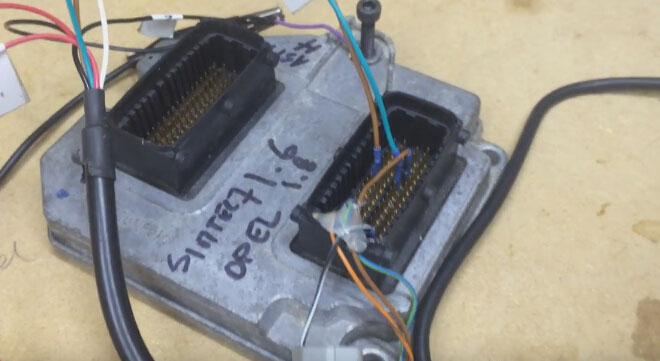
Carprog v8.21 100% read & write Opel CAN Siemens Simtec 71.6

Cool! Just succeed in reading and writing Opel CAN ECU Siemens Simtec 71.6 Advanced v0.7 with Carprog 8.21; i mean, i used this Carprog to change mileage. Share with you all.
My Carprog 8.21

The source (obd2france.com) is advised by a forum fellow. His has lots of experience on new update regarding mileage correction:
Focus 2008 ....ok
Cmax 2010 ....ok
opel many ecu(bensin and diesel) ....ok
Fiat croma, punto, bravo...ok
Passat b6 2007....ok
This is what i did...
Open Carprog v8.21 interface
Select ECU-> Opel CAN-> Siemens Simtec 71.6 Advanced v0.7

Make sure that Carprog and ECU is connected in a good condition


Then select Read EEPROM
Click OK


Connecting to ECU...
Reading EEPROM...
Reading 100%, Eeprom info

Change the mileage, then click Write EEPROM, OK to continue

Connecting to ECU...
Writing EEPROM...
Writing 100%

Yes. Change km success with carprog 8.21 online

2016年7月20日星期三

KESS V2 FW V4.036 add tokens - SUCCESS (personal experience)

I bought a KESS V2 Master Truck version with K-Suite 2.22 Firmware 4.036 online three months ago. When the tokens used up, I followed the guide video to add token and it was working. Here I will give a clear explanation of KESS token reset.

Before adding token you need download two zip files:
  1. KSuite-tokens.zip
  2. zip
After that you can start toad tokens for KESS V2 truck, I summarized following steps for your reference:
Step1. First you should check if the KESS V2 K-suite software is well installed.
Open My Computer>>Device Manager>>Universal Serial Bus Controller>> USB Device
Step2. Remember disconnect both local area network and wireless network otherwise you will damage the device.
Step3. Unzip Tool.zip file you will get 3 files: “K10033818” ECU-Tuners, “Tokens” folder and “Token1.tok”, copy these 3 files to the desktop, then delete “Tool folder” and the zip file both on the desktop.
Step4. Cut KSuite-tokens.zip to local disk [C] and unzip it.
Step5. Open “K10033818” ECU-Tuners browse My Computer>> Local disk [C]>> KSuite-tokens>> KSuite. Click “OK” >> “Reset Token Count” >> “OK”.
Step6. Wait for a minute, it will show KSuite is updating, after that close the KSuite interface.
Step7. Delete the “KSuite-tokens” folder in local disk [C], unzip KSuite-tokens.zip and get “KSuite-tokens” folder again.
Step8. Rename “Token1.tok” on desktop to “Token2.tok”, copy “Token2.tok” to “Tokens” folder on desktop.
Step9. This step is to repeat Step5 and Step6, after that you can add tokens for KESS V2 successfully.
Also here I want to thank engineers of www.obd2france.com they gave me much useful help to add token for my KESS V2.


This is the guide video for KESS V2 token reset:


2016年7月19日星期二

How to use CANEMU CAN filter for Renault Laguna III, Megane III, Scenic III

This is the CANEMU CAN filter connection manual, which aimed to help use this CAN filter to prevent regeneration of the old mileage state in vehicle dashboard (odometer). CAN filter doesn’t interrupt any vehicle electronic system, there will be no errors or DTC’s after install. Now you can change mileage state with your preferred mileage correction tool on these Mercedes-Benz and Renault vehicles.

Why do you need Renault CAN filter?

Renault filter enables you to make km corrections
Renault filter algorithms filters the data sent from the vehicle CAN bus and blocks the signal with information about the old vehicle mileage state (this data comes from the ABS controller to the instrument cluster).
What model can work with?
Renault Laguna III, Megane III and Scenic III.
How to use this CANEMU CAN filter?
1 Renault Laguna III installation instruction
Remove instrument cluster and change mileage in 24C16 EEPROM.
  • For first prepare CANEMU board: solder 3 configuration point. Use fine KYNAR wire for installation.
 
Install CANEMU can filter as the picture displays:
2 Renault Megane III installation instructions

Remove instrument cluster and change mileage in 24C16 EEPROM.
  • For first prepare CANEMU board: solder 3 configuration point. Use fine KYNAR wire for installation.
 
Install CANEMU can filter as the picture displays:
3 Renault Scenic III installation instructions
Remove instrument cluster and change mileage in 24C16 EEPROM.
  • For first prepare CANEMU board: solder 3 configuration point. Use fine KYNAR wire for installation.
 
Install CANEMU can filter as the picture displays:

2016年7月18日星期一

[Feedback] Obdstar F108 success on Citroen aircross 2015

This is a review on OBDSTAR F108 key programmer running on Citroen aircross 2015.


This is OBDSTAR F108 package i got from obd2france.com. Sorry for photos are not with high definition as you wish.
The package includes:
F108 main unit
TF card

All items were packed in a hard paper box, in a good condition... No damages.
I purchase this device because of the following reasons:
1) i have 2015 Citroen aircross needs adding new keys, and this is the only professional auto key programmer for Citroen (also, Peugeot and DS)

2) my wife drives 2009 Peugeot 508. F108 works for that also; maybe in the near future, it will...

3) The price point for F108 was just right. € 157 is ok price for me.

4) F108 can read PIN codes and program keys together. I don’t need to buy other new PIN code readers.

To begin with, I go through the basic functions. Below is the start-up screen as soon as the device is plugged into the OBDII port (The unit will power-up as soon as it's plugged in).

It gives options then:
FUNCTION
SETTING
ABOUT
SELFTEST

IMMMOBILIZER

Immo software v31.09

Peugeot
Citroen
DS

...
The device is easy to use (plug and play) and set-up is pretty self explanatory. i cycle through the scanner using the arrow buttons and enter/back buttons.

And managed to read Citroen aircross PIN code

All done with the help of the screen instruction - very detailed.

Sp, if you're a home mechanic, it’s is seriously worth of your purchase, like me. Just need access to your car (Peugeot, Citroen, DS). It's straight forward and easy to operate, accessing cars and reading security codes and programming new keys quickly.

The instructions are clear to follow with pictures for every step. Updating the software is easy too, especially if using a laptop with an SD card reader as you plug the tool's card into your computer, run the software, update, unplug and go.

It’s a happy shopping in China; but i think it would be better if OBDSTAR F108 has the option of the French language.

2016年7月13日星期三

[feedback] Free MPPS V16 working for BOSCH EDC16 and EDC17 ECUs

Wanna share my MPPS V16 China with you all, from free download MPPS v16 software to personal experience of it with BOSCH EDC16 and EDC17 ECUs.

Free MPPS v16.0.1.8 i got from http://www.chinaautodiag.com/
http://www.chinaautodiag.com/download/mpps-v16.zip
(i found it is a good place to download auto diagnostic software - ALL FREE!!)
I used this on Windows XP SP2. Maybe Windows Vista, Windows 7, Windows 8 can be tried on... I’m not sure

It can be compatible with my clone MPPS device. It’s from a China site “obd2france.com”
and its PCB

MPPS 16.1.02 features (the seller says):
The MPPS is a powerful programming tool. It offers like most other tools reading / writing operations and checksum support, however it also includes some additional features:

- Excellent recovery functions.  In some cases MPPS can recover ECU’s which others tools can not even make communications with. On certain controllers it even works when with no program is present (a blank memory).

- Selectable full / partial reading and writing when the ECU allows this function.
- Selectable reading / writing speed.

- Writing “changes only” function for faster programming (when supported by the ECU).
- Auto detection of K-Line/CAN, and option to bypass and force preferred means of communication.

- Temporary bypass of immobiliser to allow flashing on the bench on ME7 systems.
- Boot mode support for ECU’s with C167 and ST10 processors.
- EEprom read/write functions for some ECU’s are included.
- VAG MEDC17 TPROT level checking without opening the ECU.

My personal experience of MPPS v16:
This MPPS V16 clone is fine. It can be an accurate copy of original precisely exact same capabilities and no loader. I have tested several BOSCH EDC16 and EDC17 ECUs. I’m here inform you of the outcome.

No problem to write EDC16C34. EDC16 is in the safe zone as far as it is in the list. MPPS does BMW EDC16 including checksums very well. I doubted the capacity to read/write EDC17 as many mpps users do at the very beginning.

MPPS V16 is extremely good, uses loader to run each and every time. No direct run from desktop shortcut like earlier versions. The first study was creating EDC17 on an A3 2.0tdi cba/clb, succeeded through obd assistance some UDS program by no means I trouble with this. Then successfully read EDC17CP14 on a Golf 2.0 CR 2011.

I have written more edc17 with mpps clone. I calculated checksum with software race of dimensioned sport or with crcfix of magpro is perfect.

After tuning file needs recalculated checksum with WinOLS that can write in car… (ECU).
As it turned out, MPPS clone is really good on reading EDC16 on BMW and EDC17 on VAG group.

Successfully reading Bosch edc17 cp14 Passat TDI CR DPF 140hp 2009.5 model year, picture is taken below:


  This is from OBD2 Francais website technical support:[feedback] Free MPPS V16 working for BOSCH EDC16 and EDC17 ECUs