显示标签为“Renault can clip China”的博文。显示所有博文

2017年2月16日星期四

Renault CAN CLIP ecu programming & key programming?

Usually not! Renault can clip diagnostic tools esp. China clone cannot program ECUs or add new keys to Renault cars. So, which Renault diagnostic interface can do that?
Renault-COM Diagnostic and Programming Tool... Here we go.

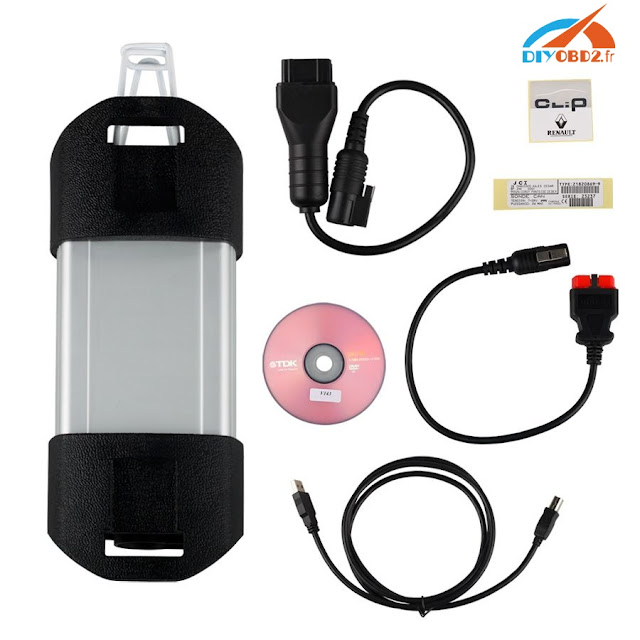
Renault-COMRenault CAN CLIP
Figure  
Price€84.99€149
Operation systemWindows 2000 / XP / Vista / 7/10Windows XP/ 7
LanguageEnglish, Arabic, Croatian, Czech, Danish, Dutch, Finnish, French, German, Greek,Hebrew,Hungarian, Italian, Polish, Portuguese (Brazilian), Romanian, Russian, Serbian (Cyrillic), Spanish, TurkishEnglish, German, Danish, Spanish, Finnish, French, Italian, Norwegian, Dutch, Portuguese, Romanian, Sweden
BluetoothYesNo
Obdii diagnosisYesYes
ECU programmingYesNo
Key programmingYesNo
Airbag programmingYesNo
Injector programmingYesNo
Service resetYesNo
Power steeringYesNo
EGRYesNo
DPFYesNo

So, Renault-COM Bluetooth should be a better choice for diagnosis and programming at the dealer level advanced device for Renault vehicles. It can access various electronic control units (ECU) such as engine, gearbox, ABS, Airbag / SRS. It can display identification, read and clear fault code memory, display and store measured values and perform actuator tests.
OBD2 at the Renault-COM interface contains eight pieces of ISO9141 K-Line, a piece of ISO9141 L-Line, CAN-BUS and analog-measuring circuits.

Multi-language available:
English, Arabic, Croatian, Czech, Danish, Dutch, English (United States ), Finnish, French (standard), German, Greek, Hebrew, Hungarian, Italian, Polish, Portuguese (Brazilian), Romanian, Russian, Serbian (Cyrillic), Spanish, Turkish

Characteristics Renault-COM:
Fully Multiplexed Bluetooth-in-One Interface
ECU automatic recognition
Automatic vehicle scan
ECU identification: - finds all calculators available in the car by pressing the single button
Bluetooth - wireless connectivity to your laptop or a Windows tablet
Fault code (DTC) reading
Compensation fault code, with the ability to store the DTC vehicle history forever
Playback frame playback
Live live measurement / recording data from live data, fully dynamic with graphic up to 6 data streams at a time, recording and other manipulations
Diagnostic protocol printing

Testing of actuators, test components via direct ECU access
Renault-COM Special functions - perform reseller level high-end programming / coding such as:

Key Programming
Service reset
DPF (Diesel Particulate Filter) regeneration
EGR (Exhaust Gas Recirculation) self-test
Airbag Programming
Programming the injector
Power steering
Programming ECU
Car configurations

It is from Renault can clip technical support:Renault CAN CLIP ecu programming & key programming?

2017年2月6日星期一

How to reprogram Renault Scenic ECU by Renault CAN Clip?

This is a step-by-step guide for using Renault CAN Clip Diagnostic Interface to reprogram ECU for Renault Scenic Diesel 1.5 DCI. Hope it helps.
Step1. Open Renault CAN Clip software then click the third icon at left side as picture shows:
It will automatically feature out vehicle information. Click “Reprogramming”.
Step2. Choose “Injection” then click “Validate”.
Enter the repairing order then click “Validate”.
Step3. Before ECU reprogramming, you should check battery voltage.
Choose “CD-ROM” when the select reprogramming mode window pops up, after that click “Validate”.
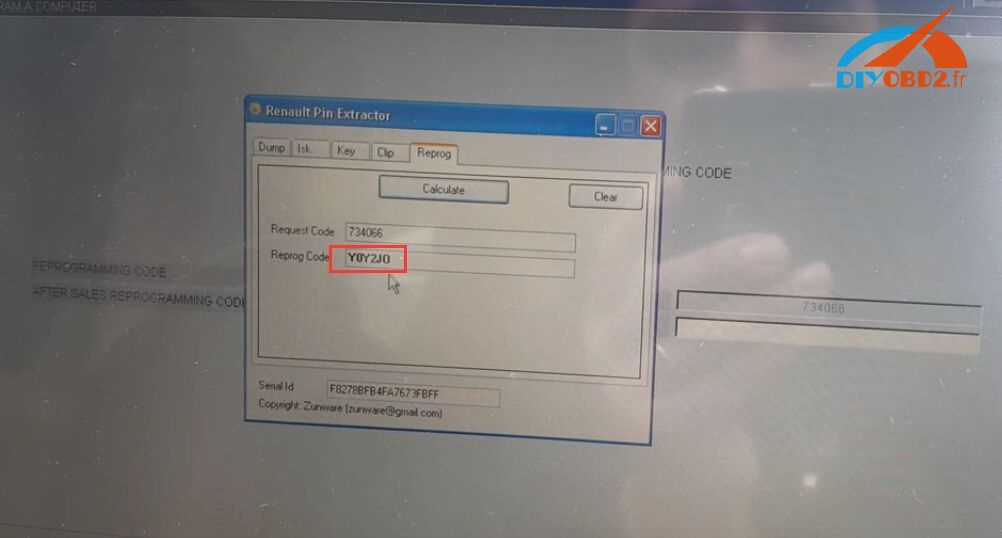
Step4. Now you need to enter “After Sales Programming Code”. You can use “Renault Pin Extractor” to calculate the code: click “Reprog”→ enter the programming code 734066 at “Request Code” blank→ click “Calculate”.

Copy the “Reprog Code” to “After Sales Programming Code” blank and click “Validate”.
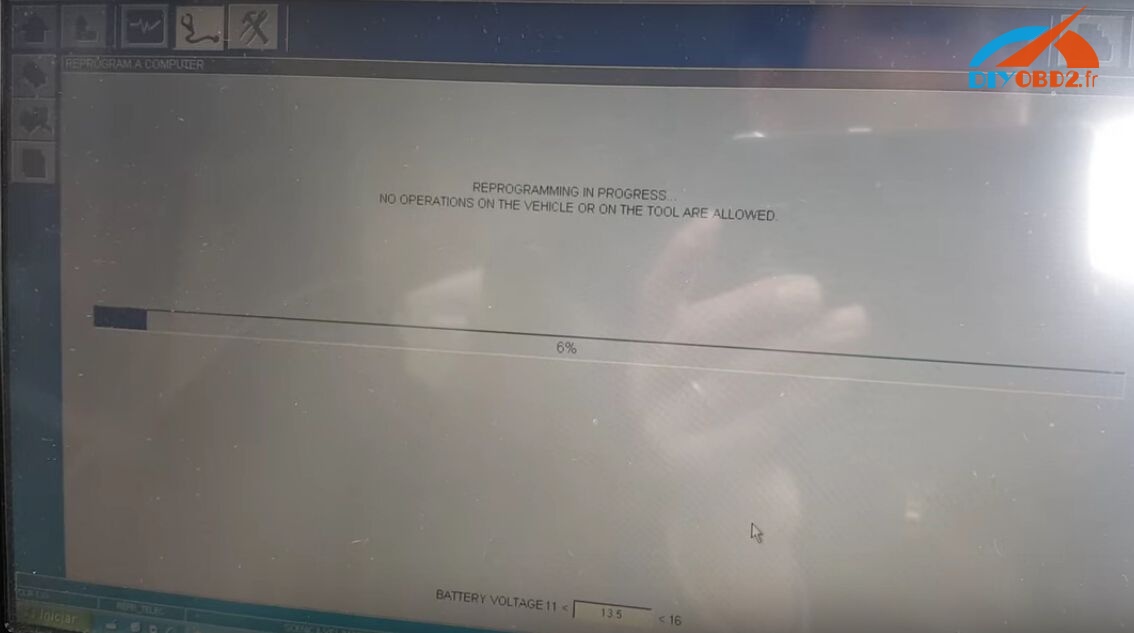
Step5. Now Renault CAN Clip will start reprogramming Renault Scenic ECU. Just wait it complete.
Check all following items and click “Finish”.

It is from Renault can clip technical support:How to reprogram Renault Scenic ECU by Renault CAN Clip?

2017年1月16日星期一

Renault CAN CLIP program new Laguna II 2 button remote key card OK

This is a detailed tutorial to show you how use Renault CAN CLIP to program another one new Laguna II 2 button remote key card. Check below steps!

All you need:
Renault CAN CLIP Diagnostic Interface with laptop running Windows XP/ Windows 7

New Laguna II 2 button remote key card with all other old working key

Step1. Connect Renault CAN CLIP with car and open CAN CLIP software.
Use one working key to turn ignition on.
Go to the UCH section
Click the top bar button as below to enter configuration mode.
Step2. Choose “Encoding/ Reading” then click “RESERVE” SC003 button.
Enter “5938” followed by enter when prompt for a code.
Now write down the ISK Code as it shows.
You need the bytes from 18 to 23, come cars will also require byte 24. In the top bar you have the byte ID and the bottom bar you have the actual byte value. So in this case, the ISK code is 48FDA395AFC5.
Step3. Open Renault Pin Extractor then click “ISK” tab.
Choose car type Laguna 2 UCH 95160 then input the ISK code.
Click “ISK TO PIN” and the pin code is calculated.
Go to “Decoding/ Reading” then click the SC010 button.
Remove the key card from card slot and press “Continue”.
Now you need to insert all key cards one by one. (Start from the old working keys. When one key finish, press “Continue” to present next key.)
The Outcode is calculated by CAN CLIP as below:
Step4. Open Renault Pin Extractor again and click “Clip” tab. Select “Get Incode” option.
Enter the Outcode, VIN and Pin Code. (For VIN you can check the bottom of screen) Click “Calculate” button and you get the Incode.
Copy the Incode and paste it to the Outcode result page.
Insert all key cards one by one again following the screen tips. When the new key card is 100%, you remove the key and click “Continue” to complete key programming.
Now Renault CAN CLIP successfully programs a new Laguna II 2 button remote key card!

It is from Renault can clip technical support:Renault CAN CLIP program new Laguna II 2 button remote key card OK

2017年1月13日星期五

Renault Can CLIP V164 download on Mega:Tested YES

Renault CLIP V164 is tested to work no issues!  Free download Can CLIP V164 for Renault:
It’s crack, no pass but NOT the tested version.
Safe to use:
Renault Can CLIP V163.exe
EDIT:
(01/13/2016) Renault Can CLIP V164 has been tested OK!

Renault can clip windows 7 64 bit?

Renault Clip software is always tested ok in Windows XP system. But XP system is kind of out of date. Nowadays, most use Windows 7 64 bit. To run CLIP on WIN 7 or not, that’s a question of luck.
Here are users feedback on can clip windows 7 64 bit, some successful & some failed:
– Works fine on win7 x86.
– Yes, Can Clip runs on Windows 7-x64 and Windows 8….8.1-x64 m because use x-86 files from the system.
– If your version of Windows 7 Home Basic or Home Premium x64 it is normally not work, try Enterprise or Ultimate , I use Win 7 Ultimate x64 and canclip works very well
– Automatically detect a driver in both win7 and in win7-x86-x64, a kind can clip ALIANCE driver, bosch automotive … etc..
is absolutely necessary to have all updates made​to the operating system before installation canclip
– i try install in win 7 x64 pc but the driver of VCI not work
– It is NOT working in my Win7 64-bit
– same issue, not working W7 64bit

renault can clip reprogramming?

YES! Diagnosis and reprograming are the two main functions of renault can clip
renault can clip ECU programming?
some experienced users says it needs good charger 70A and voltage over 14V

CAN CLIP card key programming?

100% possible to use HF and non HF cards on these cars.
obviously if you code non HF CARD to HF car, HF function will not work on this car.
and if you code HF card to non HF car , the HF function will not work.
done it many times without any problem via true code and avdi

Renault CAN CLIP user manual?

Related key words:
Renault can clip ebay?
CAN CLIP Renault unit
Renault can clip interface PCB
Renault clip diagnostic software download
Renault clip language
Renault can clip windows 7 64 bit
Renault can clip installation tutorial
CAN CLIP firmware update
Renault can clip diagnostics interface
Renault can clip car list
Renault can clip re-programming
Renault can clip ECU programming
Renault can clip card key programming
Renault clip programming mode asks for 7 digit serial
Where to download and save data
CAN Clip VS Multidiag Pro VS DDT2000
Renault CLIP running with Nissan Consult 3?
Repair flash ISO & CAN BDM chip
CAN CLiP ISO LED not light up
Clip RLT 2002 Probe “Failure of reservation of probe” (solved)
Renault CAN CLIP reviews
Renault can clip user manual

It is from Renault can clip technical support:Renault Can CLIP V164 download on Mega:Tested YES

2017年1月12日星期四

Free download Renault Can CLIP V164 in mega+ SAFE Tested source

Good news for Renault CLIP users: newest Renault Can CLIP V164 is now available! Below obd2france.com offer you V164 software all free download links and tested safe source.

Renault Can CLIP V164 software free download links all here:
(Unknown security, not tested, so try on your own risk)
https://mega.nz/#!7wBgXByB!xnuJ_FQkwx74oHNpiolJircwc9yev1_OYG39WGhGwOo
http://takefile.link/sdx78vp4s7ac
https://hotlink.cc/9pe1fx8undj9
http://ex-load.com/tv6qrewd9ju8

Renault Can CLIP V164 tested SAFE source here (ONLY €9.9)

Compatible Renault Can CLIP interfaces:

SP19-B (€125 free shipping)

SP19-C with AN2131QC chip (€125 free shipping)
http://www.obd2france.com/wholesale/renault-can-clip-diagnostic-tool.html
Renault Can CLIP V164 software information:
Region: All Regions
Language: English (Multilingual)
Version: v164
Developer: SPX
Platform: Windows XP, Vista (haven’t tested), Windows7
Quantity of CD: 1 DVD DL
Year: 2017
Date of update: 01/2017

Renault Can CLIP V164 hardware requirements:
At least AMD or Intel Celeron/Pentium CPU 1.5 GHz, 1 GB RAM, 10 GB free HDD space, USB 1.1 port (USB 2.0 recommended)

Renault Can CLIP V164 supported languages:
English, German, French, Danish, Spanish, Portuguese, Finnish, Italian, Norwegian, Dutch, Romanian, Swedish and Russian

Renault Can CLIP V164 function:
Computer test
Automatic test of all computers
Airbag test
scantool (OBD tests)
Base Doc (access to Technical Notes)
Physical measurements
Antipollution
multimeter
It's very simple to diagnose a vehicle using Renault CAN Clip Diagnostic Interface: just select the vehicle make, enter the V.I.N. and press ENTER.

Renault Can CLIP V164 covered models:
Alpine
Avantime
Cherokee
Clio II
Clio III
Clio Phase 1 & 2
Clio Phase 3
Clio RS V6
Espace (1-3)
Espace IV
Extra
Kangoo
Kangoo II
Koleos
Laguna
Laguna Estate
Laguna II
Laguna III
Logan/Sandero
Logan India
Mascott/Master Propulsion
Master from 1981
Megane Megane Classic/Estate
Megane Coupe/Cabriolet
Megane II
Megane III
Megane Scenic
Modus
New Twingo
R19
R21
R21 Savanna
R25
R4 from 1983
R5 New
Safrane
Scenic II
Scenic III
Spider
Symbol-Thalia
Trafic from 03.89
Trafic II
Twingo
Vel Satis

2017年1月9日星期一

Original Renault CLIP vs Renault CAN CLIP china clone

Any difference between among the genuine and copy Renault CAN CLIP diagnostic interface? Details are listed here for reference.

Genuine Renault can clip


But there are four copy versions of Renault CLIP in China, with . For details, please refer to the site:

Best option: a 1 to 1 clone of the original:

In the PCB, engineers add the high quality chip CYPRESS AN2135SC or CYPRESS AN2136SC.

The new chip AN2135SC/AN2136SC solved communication issues of old CLIP (esp. the most populous version sp19-b). That make CLIP work more stable and can be used for a longer time
Using other versions of Renault CLIP, the diagnostic interface will disconnect if users have no operation for 10 minutes around after successful communication to the car.
With this new CAN CLIP for Renault, the issue solved, with the chip AN2135SC/AN2136SC. This is the PCB with new design.

Genuine CAN CLIP vs Clone Renault CAN CLP
Genuine CAN CLIP: ok in diagnosis, ECU programming, key programming
Clone Renault CAN CLP: highlight of obdii diagnosis, ECU reprogramming
CLIP versions above differs in functions, PCBs and price. All have been tested without issues on Automatic test of all computers, Physical measurements, OBD diagnostic tests, Airbag test,Antipollution, Multimeterin English/ German/ Brazil/ Denish/ Spanish/ Finnish/ French/ Italian/ Norwegian/ Dutch/ Portuguese/ Romania/Swedish.
Read the following tips if you decide to buy items from China.

Tip 1: Quality & Price
In China, you can get anything - at/for any price, problem is that you will have to accept the quality. "You get what you pay for" - And this is more or less true, there will be always someone somewhere "trying to" do it for less, but there are thresholds and once you step under them, you will have to suffer from the results. Quality of a product also depends on the material you purchase (You can't simply make gold out of wood)

Tip 2: Reasons for low costs
The only reason why the obdii diagnostic cables are made in China is because 90% of the materials (micro-controllers and ICs) come from there.That is, it's mainly about cost, most people would not be ready to pay 3-4 times the price just for the device being made in Europe or the US.
So, items are produced in high quantity and cost saving here
Anyway, good luck when but items in China.