显示标签为“fgtech bdm”的博文。显示所有博文

2017年3月19日星期日

Tested FGTech Galletto 4 V54 on VW POLO EDC15 OK

Can I use FGTECH V54 clone to read write VW POLO ECU EDC15? Yes, newly tested FGTech Galletto 4 V54 read VW POLO EDC15 OK, flash 29F400B.
FGTech V54 VAG EDC15 wiring diagram as below:
FGTech V54 User feedbacks on VAG EDC15:
Just tested my clone and works fine on edc15 VW Passat 2002.
Last year I remap an edc15p with a V54 clone successfully!
My friend has FGTech V54 clone from china and it works fine with edc15.
EDC15V (VAG) Read/Write ok (OBD)
FGTech Galletto ECU chip tuning tip: FGTech V54 needs external 12V?
When use FGTech V54 to read BOSCH ECU, for example VW Passat 2002, need external power supply!
It is a flat cable, be sure red marked wire position, if you wiring incorrectly BDM, if ECU is BOSCH, burned ECU micro.
Only connect to the car via OBD need not external power supply!
If you connect to external power supply correctly, but still not work, check whether hex inverter trigger need to replace.

2017年3月5日星期日

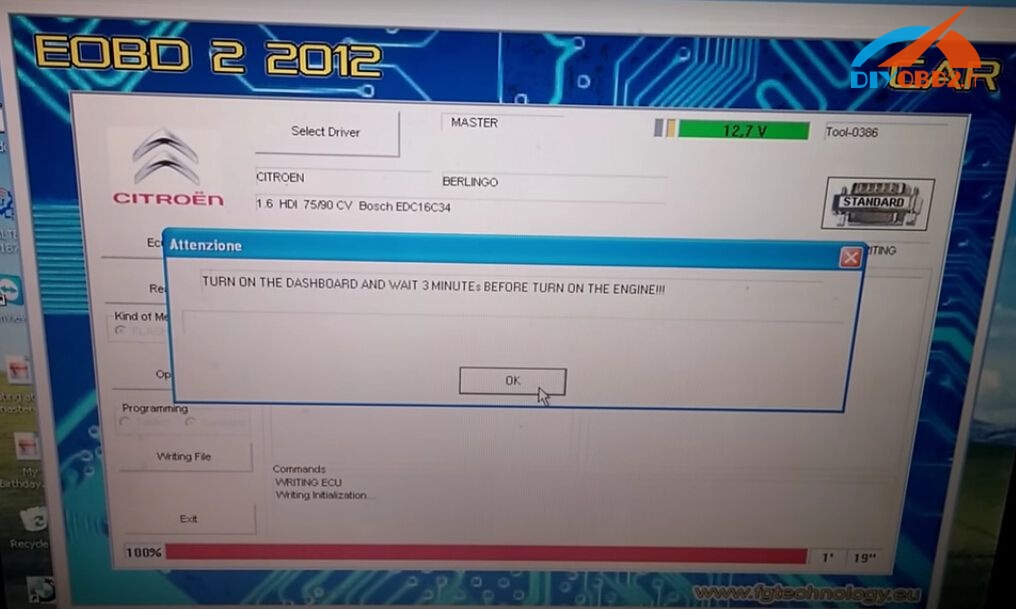
How read write Citroen Berlingo EDC16C34 OBD OK by Fgtech V54?

This blog is a detailed tutorial about using Fgtech Galletto 4 V54 Master to read and write Citroen Berlingo EDC16C34 ECU via OBD. (Not on bench) Check below steps!
Engine: 1.6 HDi Berlingo
ECU Type: EDC16C43
ECU BOSCH number: 0281012619, year 07-12-05, 9663943980
Action: Fgtech read write EDC16C43 via OBD
How Fgtech Galletto 4 read EDC16c34 via OBD?
Step1. Connect Fgtech Galletto 4 V54 directly to car OBD port via 16 pin OBD2 cable. Then connect it to laptop via USB cable. (When read ECU you don't need 12v external power supply)
Turn on the key to position 1 but don't start engine.
Step2. Open Fgtech V54 software, first click “Select Driver” to choose correct driver for your car / ECU.
Next check “ECU Data” to see if connection is OK.
Step3. Click “Read file”, enter name of the file, and reading start.
Wait until reading is 100% complete. Turn the dashboard off.
How Fgtech Galletto 4 write EDC16c34 via OBD?
NOTE:
  1. Make sure your car battery is ok. You must have over 12v steady volts to write. You can connect your car battery to external 12v charger.
  2. You can damage your ECU if voltage drops under 12v. If writing process is disrupted you can recover your ECU only by BDM restore.
Click “Write file” to start ECU writing.
When the writing complete, turn off the dashboard and wait 3 minutes.
Then turn on dashboard and wait 3 minutes. After that you can turn on the engine.

2017年2月21日星期二

Which Renault Peugeot Citroen ECU can FGTech V54 read write OK?

Hi mates! Here I share which Renault /Peugeot/Citroen ECU can read write OK by using FGTech Galletto 4 V54. All results below are tested on my own. Hope it helps!
This is the V54 FGTech Galletto 4 Master china clone I used, cheap only €55 but work fine for me!
FGTech V54 tested on French cars ECU OK:
Renault
Renault Megane Siemens S3000 read write hitachi mcu ok
Renault Megane /Laguna Sagem3000 OBD read write ok
Renault Trafic 2.5D EDC15 read write ok
Renault Delphi 2007 k-line read write ok
Renault EDC15C13 read write ok (K-line on bench and boot mode)
PSA
EDC16C34 OBD read write ok
DCM 3.4 OBD read write ok
Peugeot 207 EDC16C34 OBD read write ok
Peugeot 308 1.6 HDI 2013 Siemens SID807 EVO BOOT read write ok
Citroen
Citroen Jumpy 2.0D Siemens 802A – ok
And here I will post the link if you want to buy the same FGTech V54 as mine!