显示标签为“FGTech v54”的博文。显示所有博文

2017年4月9日星期日

How to install FGTech Galletto 4 V54 Windows 7

Hello, I would like to explain to you step by step how to install your FGTech Galletto V54 correctly on Windows 7 operation system. To do this, you must first uninstall the already installed software and the drivers. Then we start with step
  1. Run "FGTech Galletto Edited v1.0.exe" as an administrator. Important: Do not create a desktop icon and run the program yet.
  1. Next, connect the Galletto device to the power supply and then connect it via USB. The automatic driver installation fails. But do not worry, the installation is done manually.
  1. Right-click on the "Computer" icon and select "Manage". As soon as the window opens, click on Device management and select the USB port "FGTech". Here you have to click "Update driver software". And then click "Browse the computer for driver software", then "Select from a list of device drivers on the computer", then "Have Disk" and "Browse".
  1. Now look for the folder of "FGTech" on drive C. Here you open the folder "fgtech_new_driver" and select the following file: "fgtibus.inf"! Confirm everything, wait for the installation, and close all windows.
  1. Run "FGTech Galletto Edited v1.0.exe" again as an administrator. Important: Do not create a desktop icon and run the program yet.
  1. Run "Galletto win7.exe" as administrator. Create and install the desktop icon. If the installation is complete, start the program as an administrator.
  1. Ignore the next two windows with hints and confirm with OK.
FINISHED!!!
This how-to’s above would successfully solved Galletto v54 Error shown as below:
C:\FGTecg\EOBD.exe
An error occurred while trying to rename a file in the destination directory:
MoveFile failed: code 2
The system cannot find the file specified
Click Retry to try again. Ignore to skip this file (not recommeded), or Abort to cancel installation

www.obd2france.com all rights reserved, Original Article url:How to install FGTech Galletto 4 V54 Windows 7

2017年3月19日星期日

Tested FGTech Galletto 4 V54 on VW POLO EDC15 OK

Can I use FGTECH V54 clone to read write VW POLO ECU EDC15? Yes, newly tested FGTech Galletto 4 V54 read VW POLO EDC15 OK, flash 29F400B.
FGTech V54 VAG EDC15 wiring diagram as below:
FGTech V54 User feedbacks on VAG EDC15:
Just tested my clone and works fine on edc15 VW Passat 2002.
Last year I remap an edc15p with a V54 clone successfully!
My friend has FGTech V54 clone from china and it works fine with edc15.
EDC15V (VAG) Read/Write ok (OBD)
FGTech Galletto ECU chip tuning tip: FGTech V54 needs external 12V?
When use FGTech V54 to read BOSCH ECU, for example VW Passat 2002, need external power supply!
It is a flat cable, be sure red marked wire position, if you wiring incorrectly BDM, if ECU is BOSCH, burned ECU micro.
Only connect to the car via OBD need not external power supply!
If you connect to external power supply correctly, but still not work, check whether hex inverter trigger need to replace.

2017年3月10日星期五

Free download KESS V2+ KTAG+ FGTECH V54 software all here

This is KESS V2+ KTAG+ Fgtech Galletto 4 V54 full software package (1.62GB) for sharing! Download in mega, test OK and work perfectly!
Full software package for KESSV2 Firmware 4.036 + Galletto V54, Galletto USB fix ETC, KTAG Ksuite 2.13
https://mega.nz/#!Jp5WwIaZ!VHnX6ZVZnSZUJT9OC_EJBwrjRbK2PNxPeGal9XlVU1k
No pass
Compatible interface list:
KESS V2 firmware 4.036 (Top sale KESS €85)
KTAG 2.13 firmware 6.070 with free ECM Titanium 1.61 (Top sale K-TAG €75)
FGTech Galletto 4 V54 (€55 free shipping)
Useful Q&A about ECU chip tuning tool
Q: How to choose a right ECU programmer? Should I buy KESS and KTAG together?
A: If you only want to repair car ECU, you can KTAG it’s enough for your job. If you do both repairing and ECU chip tuning, KESS + KTAG should be better!
Q: What’s the difference in tokens between cheap KESS V2 and the €199 one? Are they both with unlimited tokens?
A: Yes. Both two versions has unlimited tokens. The only difference lies in token reset way: When add tokens, the cheap KESS (SE87-C) should connect with PC via USB cable, but SE87-D has token renew button, add tokens by directly press the button!
Q: I am using Ktag but not sure for what situation the token is cut?
A: When use KTAG to backup and read ECU, it doesn’t need tokens. For write ECU, KTAG need tokens.
Q: KTAG and KTM100, What’s the difference?
A: KTAG and KTM100 both can do checksum. KTM100 can read when ECU is encrypted, such as BOSCH MEV1746BMW (P171) and BMW N55 N20 ECU.
Q: And what about KESS V2? Token and ECU read write?
A: KESS V2 can read write ECU via OBD or Boot Mode. For new car ECU, you can use OBD way. KESS V2 has no backup function and every read write cost tokens.

2017年3月5日星期日

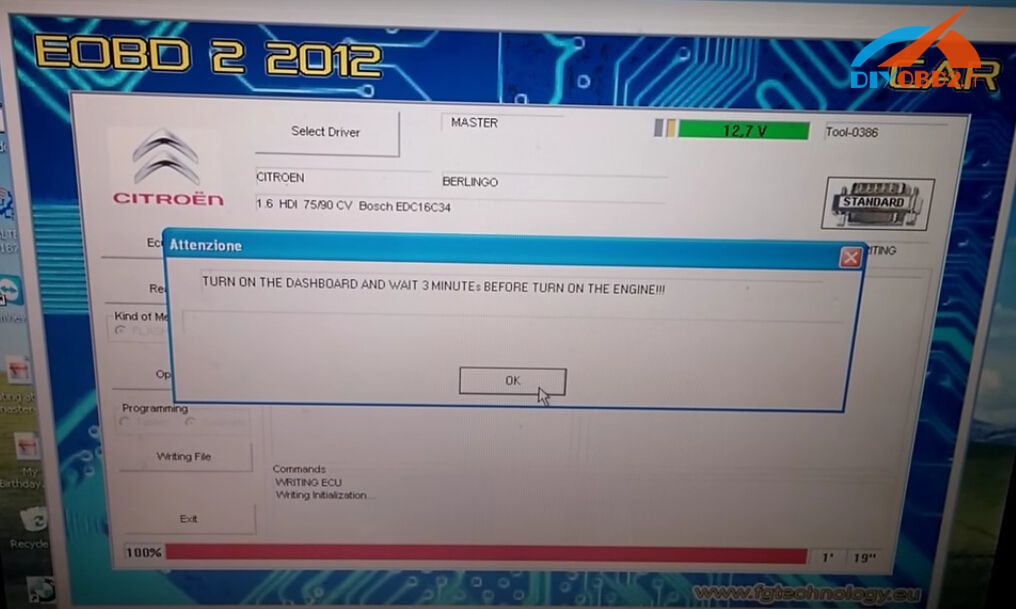
How read write Citroen Berlingo EDC16C34 OBD OK by Fgtech V54?

This blog is a detailed tutorial about using Fgtech Galletto 4 V54 Master to read and write Citroen Berlingo EDC16C34 ECU via OBD. (Not on bench) Check below steps!
Engine: 1.6 HDi Berlingo
ECU Type: EDC16C43
ECU BOSCH number: 0281012619, year 07-12-05, 9663943980
Action: Fgtech read write EDC16C43 via OBD
How Fgtech Galletto 4 read EDC16c34 via OBD?
Step1. Connect Fgtech Galletto 4 V54 directly to car OBD port via 16 pin OBD2 cable. Then connect it to laptop via USB cable. (When read ECU you don't need 12v external power supply)
Turn on the key to position 1 but don't start engine.
Step2. Open Fgtech V54 software, first click “Select Driver” to choose correct driver for your car / ECU.
Next check “ECU Data” to see if connection is OK.
Step3. Click “Read file”, enter name of the file, and reading start.
Wait until reading is 100% complete. Turn the dashboard off.
How Fgtech Galletto 4 write EDC16c34 via OBD?
NOTE:
  1. Make sure your car battery is ok. You must have over 12v steady volts to write. You can connect your car battery to external 12v charger.
  2. You can damage your ECU if voltage drops under 12v. If writing process is disrupted you can recover your ECU only by BDM restore.
Click “Write file” to start ECU writing.
When the writing complete, turn off the dashboard and wait 3 minutes.
Then turn on dashboard and wait 3 minutes. After that you can turn on the engine.

2017年2月21日星期二

Which Renault Peugeot Citroen ECU can FGTech V54 read write OK?

Hi mates! Here I share which Renault /Peugeot/Citroen ECU can read write OK by using FGTech Galletto 4 V54. All results below are tested on my own. Hope it helps!
This is the V54 FGTech Galletto 4 Master china clone I used, cheap only €55 but work fine for me!
FGTech V54 tested on French cars ECU OK:
Renault
Renault Megane Siemens S3000 read write hitachi mcu ok
Renault Megane /Laguna Sagem3000 OBD read write ok
Renault Trafic 2.5D EDC15 read write ok
Renault Delphi 2007 k-line read write ok
Renault EDC15C13 read write ok (K-line on bench and boot mode)
PSA
EDC16C34 OBD read write ok
DCM 3.4 OBD read write ok
Peugeot 207 EDC16C34 OBD read write ok
Peugeot 308 1.6 HDI 2013 Siemens SID807 EVO BOOT read write ok
Citroen
Citroen Jumpy 2.0D Siemens 802A – ok
And here I will post the link if you want to buy the same FGTech V54 as mine!

2016年7月12日星期二

Buy KESS V2 or KTAG or FGTECH?

KESS V2 is a ECU programming tool that is perfect for OBD use, With KESS V2 you programming directly through the OBD port of the vehicle. Many ECU has the advantage that can be read and write from OBD port (so KESS V2 is perfect).

If you want to make a full BDM read, recommend you use Ktag SW V2.13 FW V6.070. KTag is perfect for Jtag, BDM and all the Boot application (tricore and ST10), with Ktag you need to take apart the ECU and open it, after you can make the read/write operation. There are lot ECU that need to disassemble from the car and open and this is the case for all the ECU that need to be programmed withJtag, BDM and Boot protocols, so KTAG is needed.
FGTECH Galletto is advanced ECU programmer, it reads and writes the Engine ECU data via BDM, OBD and tricore. It covers Motorcycle that KESS V2 and KTAG can't do, and fgtech is no token limitation.

Where to buy KESS V2, KTAG and Fgtech?

I strongly recommend you www.obd2france.com who has been dealing with these tools for many years so the quality and price trustful.
I take the several version of KESS V2, KTAG and FGTECH PCB for example, since there are available multi-versions and with different PCB.
Seeing is believing!

This is KESS V2 firmware V4.036 PCB.

This is Ktag firmware V6.070 PCB.

This is FGTech Galletto V54 PCB


I think the essential differences among KESS V2, KTAG, FGTECH V54 are listed above, hope it helps.

 This is from OBD2 Francais website technical support:Buy KESS V2 or KTAG or FGTECH?

Xprog-m v5.6 read Citroen C2 iaw6lpc.105 ECU

Citroen C2 with a magneti marelli iaw6lpc.105 ecu, the car has many problems with the ecu. Here are some info about it offered by forum bros. Share it here.

what`s better read with xprog or read with Galletto?
Galletto may read not full dump of 512KB. Xprog-m would be a better choice.

how can i read this mcu with xprog ?
Here is the photo with xprog.
IAW-6LPC

This is from OBD2 Francais website technical support:Xprog-m v5.6 read Citroen C2 iaw6lpc.105 ECU

2016年6月15日星期三

FGTech Galletto 4 v54 cannot Be Installed (Solved)

I have described my problem about installing FGTech Galletto 4 v54 with error “DeleteFile failed; code 5” and advised solutions from engineer in this blog. Sincerely hope to help people with the same issue.

Problems description:
The FGTech V54 can’t be installed with the error followed:
An error occurred while trying to replace the existing file: DeleteFile failed; code 5.
Click Retry to try again. Ignore to skip this file(not recommend), or abort to cancel installation.


Every time, I clicked the installation. The time on CP was changed to 12/2012


Advised solution:
1Do not mind the changed time. It’s the usual situation.
2The operation system should be windows XP.  
3Watch this installation video guide:
https://www.youtube.com/watch?v=Tre9kcDTn7c&feature=youtu.be
Notice: you should install FGTech V54 for twice time.  


This is from obd2france.com website technical support: FGTech Galletto 4 v54 cannot Be Installed (Solved)

2016年5月29日星期日

Top 10 car ECU remap tools for beginners

1.Galletto 1260 ECU Chip Tuning Tool
Galletto 1260 is a cheap and efficient device with hardware and software for auto chip tuning.
Galletto 1260 features:
It works on EDC16, EDC15, MEx.x , DELCO and many more engine4s ECU.
It is compatible with the newest modern diesel TDi, HDi, JTD, and petrol cars.
It supports more cars than any other obd2, eobd tuning tools.
Language: English/ Spanish/ French/ German/ Italian/ Portuguese
2.KWP2000 Plus ECU Remap Flasher
KWP2000 Plus is an improved version of KWP2000. It is a cost efficient tool that read and writes vehicle ECU software.
KWP2000 Plus functions and features:
It is easy to use
It reads and analyzes current ECU software
It upgrades the ECU software with a re-mapped file
It repairs ECUs with software problems or corruption.
It supports high speed ECU flashing
It leds indications for USB-power Car-power/rx/tx
It supports both KWP2000 plus software and other KWP/ ISO software.
3.V54 FGTech Galletto 4 Master BDM-Tricore-OBD Function ECU Programmer
FGTech Galletto is a famous chip tuning tool for all cars, trucks, motorcycles and Marine. Its latest version is V54.
The V54 Fgtech Galletto features:
It not only works as FGTech Galletto 4-Master, but also work as BDM-OBD.
It supports Tricore Function
It supports all cars, trucks, motorcycles, Marine, BDM MPCxx, BDM Boot Mode Tricore and checksum
It support languages: English/ Italian/ German/ French/ Spanish/ Portuguese/ Czech/ Turkish
It supports Windows XP, Vista and Win7
Unlock version, can use directly, no need activation
FGTECH V54 PCB board: Specially designed
4.XPROG-M V5.0 XPROG-M Programmer X-PROG-M V5.0
The XPROG-m programmer is an improved version of XPROG programmer. It fully upward-compatible hardware with XPROG programmer and have many additional features. Its latest version is V5.0.
XPROG-M Programmer V5.0 functions and features
The XPROG-m can be connected by BDM.
It supports in-circuit and on-board programming of Motorola 68HC05, 68HC08, 68HC11, 68HC(S)12 family MCU's, Texas Instruments TMS370/TMS374 family MCU's and serial EEPROMs.
5.Piasini Engineering V4.3 Master Version
Super Piasini Master V4.3 can read all dump of chip by bin file and you can write or edit dump yourself. It is updated version for V4.1, support more vehicles.
Piasini Engineering V4.3 Master functions and features
  1. Latest Firmware version: V4.3
  2. With USB dongle, software no need active, directly use.
  3. It is Master version, support full dump file read and write, support more vehicle list than V4.1.
  4. JTAG – BDM – K-line – L-line – RS232 – CAN-Bus
  5. Read/Write Programmer
  6. Windows XP System
  7. Checksum Correction Incorporated for Mitsubishi/Denso/Hitachi
  8. Server On-line Updates and Security Survey
  9. New ECU Implementation Free of Charge
6.06 KESS V2 OBD Tuning Kit
V2.06 Kess V2 following on the success of the tremendously stable and versatile Kess 1, this latest addition to the Alientech stable is probably the most advanced tool available today.
V2.06 KESS V2 functions and features:
Software Version: V2.06
 Do car ECU programming
Support Languages: English/German/ Spanish/ Italian/ Portuguese/ French
 With coverage of all major brands and protocols including Line, CAN, EDC17 and MED17 and Ford J1850
 Work as a successful tuner with a very affordable price
No token limitation
7.06 KTAG K-TAG ECU Programming Tool Master Version
KTAG K-TAG ECU Programming Tool is designed entirely around the needs of our customers to be more responsive and reliable.
V2.06 KTAG ECU programmer functions and features:
Software Version: V2.06
Hardware Version: 5.001
Available Protocols for K-TAG: BDM MOTOROLA MPC5xx
Support BDM Function Well
8.2014 Nouveau MPPS V16 ECU Chip Tuning for EDC15 EDC16 EDC17 inkl CHECKSUM
This MPPS V16 is the newest professional ecu chip tuning tool, completely working through obd2 port, no need soldering or connecting cables, easy and high efficiency.
MPPS V16 functions and features:
Recalculation of checksum
Read / write flash
Support VAG EDC17 CHECKSUM
Requires Windows XP sp2
Support multi-Language: Afrikaans/ Albanees/ Bahasa Melayu/ Cech/ Cymraeg/ Deutsch/ Esti/ English/ Espanol/ Filipino/ Finnish/ Francais/ Galego/ German/ Hrvatski/ Indonesia/ Italiano/ Kiswahili/ Latviesu/ Lietuviskai/ Magyar/ Malti/ Nederlands/ Norsk/ Polska/ Portuguese/ Romanian/ Slovencina/ Slovenski/ Srpski/ Suomea/ Svensk/ Turkish
9.UPA USB V1.3 Programmer 
New UPA USB Programmer with Full Adaptors is the main Device can be directly connected to the Elrasoft.
V1.3 functions and features:
Support MC9S12HY64/HA32
Support program EEproms
Serial Flash memory support: A25L512/010/020/040/080/016/032, SST25VF512A/010A/020B/040B/080B/016B/032B,
S25FL004A/008A/016A/032A/064A   + Added 24C1024, 24C1025 support
Bulk erase data memory to PICs 16F913-7/946, 12F629/675
Script function GetPage
Script function AutoBaudRateDevice (hc08 devices only)
Script function GetProgrammerFrameChildCtrl ( AChildCtrlName: string): TControl
Script function EnablePicMemoryAreas ( AProgram, AID, AConfig, ACalibration, AEEPROM
Fixed bug with script functions ProgramDevice, ReadDevice
Fixed bug with 68hc11 reading if Oscillator is not set to Auto
Updated script example files
The software is digitally signed
USB driver upausb.sys is digitally signed and can be used with 64-bit windows XP/Vista/7
10.28 CARPROG Full
Carprog Full V7.28 (with all softwares activated and all 21 items Adapters) is designed with regard to demands of the customers to have universal tool for car radios, odometers, dashboards, immobilizers repair.
V7.28 CARPROG functions:
Program ECU
Program IMMO
Program Dashboard
Reset Airbag
Decode radio code
Program MPU
Support Windows XP
For more information about these tools and other ECU programmers, please visit obd2france.com official website: