显示标签为“Renault-com”的博文。显示所有博文

2017年3月5日星期日

How do you think of Renault-Com Bluetooth interface

Thread: I noticed a new bluetooth renault-com interface is out there that is suppose to be as good as the dealer Clip Tool. Also looks like PSA (PSA-com) version for Citroen and Peugeot is out to. Anyone got any more information? I found some information on PSA-com software and it looks a bit crap. Anyone got one? Looks like a clone tool maybe?

Review: Found a new post on a blog showing software for Renault com tool:

They are using Dec Superscan software. I suspect they have cloned dec Solo tool.
The link above attaches lots of renault-com screen captures, features - about software used
But only a few people have used it, and few to know how weak is the software, something as ELMscan or something as that...

I will buy a such crap tool when i see Reno represenatatives using it, for now i trust CANClip used by all Reno dealers.

CANClip is good most for reading/erasing failures and in relation with DFxxx failure definitions and treatment seen in Dialogys, very useful for mechanic guys ... for going above mechanician activity, special ecu function activations you should have something as is Derelek/Renolink, the combination CLiP + Renolink is unbeatable for Reno lovers.
But that Ren-com is to got after, seen where they are going to do with that product

It’s said that the Renault-com interface can make up for CANCLiP, ok to do key programming and ecu programming

2017年2月17日星期五

How to use Renault-COM for diagnosis & programming

Renault OBD2 diagnosis & ECU programming with Renault-COM
This is a how-to guide of the Renault-COM Bluetooth scanner for Renault OBD2 diagnosis & ECU programming & key programming.
Note: Renault can clip clone (even the best quality) cannot support ECU programming & key programming; only reprogramming available.
First install Renault-COM software on Windows 2000 / XP / Vista / 7/10
Connect the Renault Com diagnostic and programming tool to the car
Run the Renault-Com software: SuperScan
Change a language for use
Renault-COM software supports English, Arabic, Croatian, Czech, Danish, Dutch, English (United States ), Finnish, French (standard), German, Greek, Hebrew, Hungarian, Italian, Polish, Portuguese (Brazilian), Romanian, Russian, Serbian (Cyrillic), Spanish, Turkish
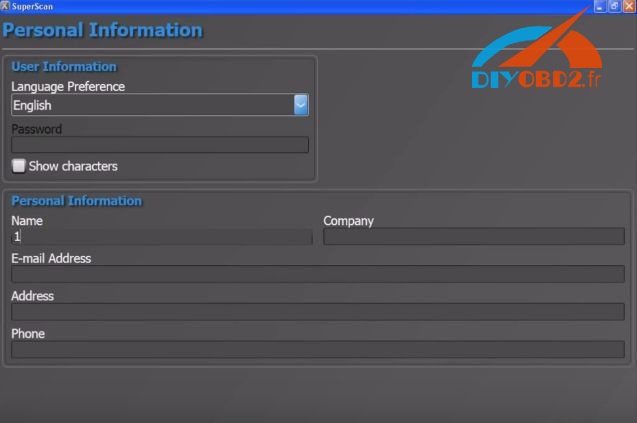
Finish the personal information
Autodetect and Test Connection
If it fails, enter the info manually to go on
Select the version: firmware: 3.1.0 software: 10.2.13

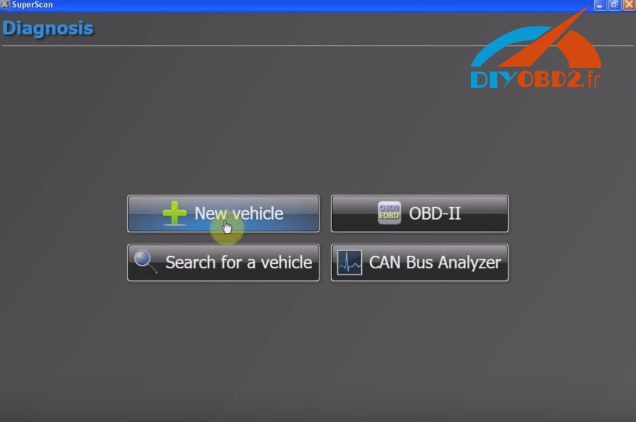
Then go to Diagnosis
Add a new vehicle: Renault

Select ENGINE ELECTRONICS , then Connect
ECU detection:
Vehicle: Renault Megane II
ECU: SAGEM S3000 (MEGANE II)
Go on for Trouble Codes


Renault-com Special Functions


Go to Actuator

Note: IMMOBILIZER functions is available for Renault key programming

2017年1月15日星期日

Tested Renault-COM Bluetooth show Dacia live data and DTC codes

This blog will show you how to diagnose Renault Dacia show live data and DTC error codes by using new arrival Renault-COM Bluetooth diagnostic and programming tool. Check below:
First, plug Renault-COM into Dacia car OBD port and pair the Bluetooth.
About how to pair Bluetooth with Renault-COM guide you can check this blog:
Next, open Renault-COM Bluetooth software and choose “Diagnosis” function.
Click “New vehicle” then choose “Dacia”.
Click “Connect” to connect Renault-COM to car ECU.
Wait a moment Renault-COM connect car ECU successfully.
Click “Live Data” and Renault-COM will show car live data like Coolant Temperature and Air Temperature…

Click “Trouble Codes” and Renault-COM will show all car DTC trouble codes, including the actual code, description and details.


Renault-COM is good as Renault Can Clip and cheaper than it!
Renault Can Clip about €125 (Differ from versions)

It is from Renault can clip technical support:Tested Renault-COM Bluetooth show Dacia live data and DTC codes

2017年1月2日星期一

How to install and use Renault-COM Bluetooth Diagnostic Interface?

This blog will show you how to install and use new arrival Renault-COM Bluetooth Diagnostic Interface software. The installation guide and steps will list as below:
About this new tool, you can check
Renault-COM Bluetooth Diagnostic Interface better and cheaper than CAN Clip

How to install Renault-COM Bluetooth software?
Step1. Download Net Framework 4.0.exe or 4.0 above in your laptop in advance.
Disable ALL available networks before install or use Renault-COM software.

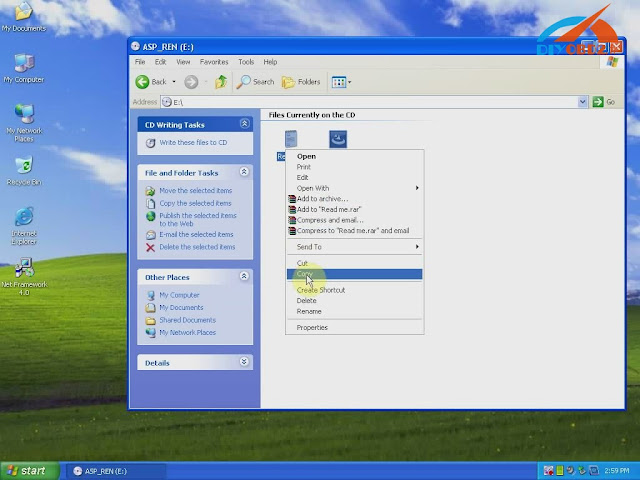
Step2. Open “My Computer” then CD-ROM “ASP_REN (E:)”, copy all files to desktop.
Install Net Framework: double click Net Framework software icon on desktop to start the Setup.
Step3. First check the box “I have read and accept…” then click “Install”.
Wait a while and Net Framework installation complete, click “Finish”.
Step4. Open “SuperScan_10-02-13”, select language as English then click “OK”.
Click “Install” and wait a while, you will see the install wizard as below. Click “Next”→ “I accept…”→ “Next” → “Next” → “Install” → “Finish”.


Now you install Renault-COM software successfully! Delete Net Framework and “SuperScan_10-02-13” from desktop.
How use Renault-COM Bluetooth software to diagnose Renault cars?
Before use you should set Bluetooth first!
  1. Click the Bluetooth icon to choose “Open Bluetooth Settings”.
Click “Add” you will see “Add Bluetooth device wizard”, check the box “My device is set up and ready to be found” then click “Next”.
  1. Choose new device “AutoScan& Programming”, click “Next”.
Choose the option “Use the passkey…” input “1234” then click “Next”.
Add Bluetooth device wizard complete, click “Finish”.
  1. Click Bluetooth “AutoScan& Programming” and “OK”. Now Renault-COM Bluetooth setting finish.
Open “SuperScan Manager”, choose the language you use then click “Continue”, “OK”.
You need to fulfill personal information part. Just enter “1” in name blank and you can continue.
Click “Auto Detect” then “Test Connection” to test everything is OK to go on.
You should enter two activation codes, one for EOBD-OBDII, one for RENAULT. You can check them at the Read Me file.
After that you can use Renault-COM to diagnose car!
Click “Diagnose”→ “New Vehicle” → “Renault” → “Create”, now you start to use Renault-COM Bluetooth Diagnostic and programming Interface!