显示标签为“vvdi mb tool”的博文。显示所有博文

2017年1月8日星期日

Free Download Xhorse VVDI MB TOOL 2.17

Free Download Xhorse VVDI MB TOOL 2.17
https://mega.nz/#!ekwzkChZ!1Q2-JUSHA72LOFKcMLj4t48c2J4bjUonLcOwL6BJknw

Require firmware V2.1.7
===== BENZ V2.1.7   =====
1. Attention: All user update device to firmware v2.1.7, software v2.1.7
2. User manual v1.7 released, overview v1.7 released
3. BGA password calculation: bugfix for lost all key W216, W164 2009-
4. Exchange W204 ESL withou renew EIS. In ESL Tools, write EIS with password(Select Auto clear TP and personalized)
5. Activate key: Change key status from unuse to used
6. Bugfix for read v57 version password from key with NEC key adaptor
7. Bugfix

Free Download Xhorse VVDI MB TOOL 2.16

Xhorse VVDI MB TOOL latest software version V2.1.6 update
*** 2017-01-07
*** Require firmware V2.1.6
===== BENZ V2.1.6 =====
1. Attention: All user update device to firmware v2.1.6, software v2.1.6
2. User manual v1.7 released, overview v1.7 released
3. BGA password calculation: Add support for lost all key W216, W164 2009-
4. Exchange W204 ESL withou renew EIS. In ESL Tools, write EIS with password(Select Auto clear TP and personalized)
5. Activate key: Change key status from unuse to used
6. Bugfix for read v57 version password from key with NEC key adaptor
7. Bugfix

2016年11月8日星期二

VVDI MB BGA Tool renew ESL replace EIS for Mercedes W212 (Review)

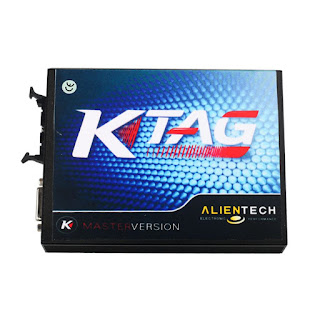
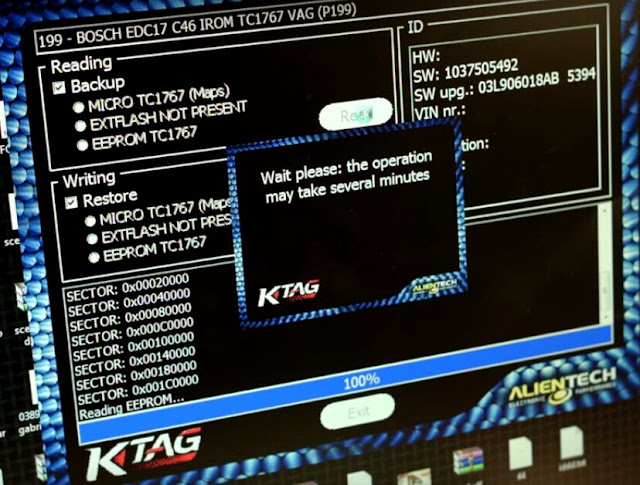
Here is a tutorial for using KTAG K-TAG ECU Programming Tool Master to read VAG Audi A3 ECU EDC17C46 on bench. Steps are as follows:
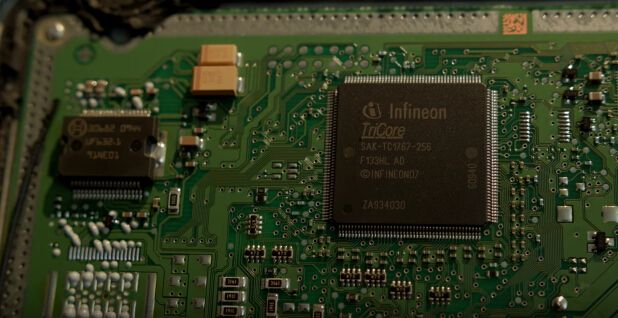
Step1. Open Audi A3 ECU EDC17C46 unit: first heat the edge to soften glue inside then open it carefully not to damage the circuit board.
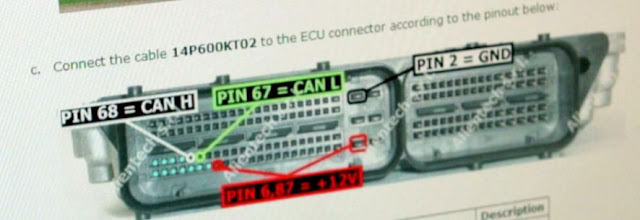
Step2. Open KATG K-TAG software. Connect the cable 14P600KT02 to ECU connector according to following pin out diagram:
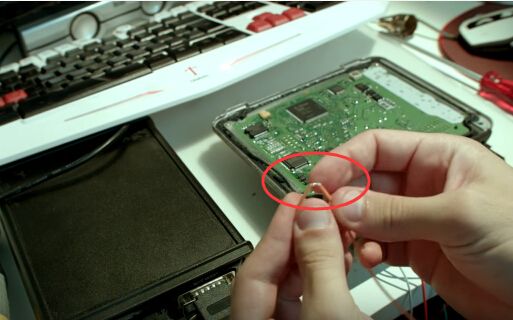
Step3. Take a wire, cut the wire cover at the middle. Solder its two ends to the two pins (red) as follow:

Step4. Back to K-TAG software, choose plug-in “P199” and click “OK”.
Click “Read” and wait it 100% complete. And then save the bin file. Now KTAG ECU Programming Tool read VAG Audi A3 ECU EDC17C46 successfully!

2016年10月17日星期一

Xhorse VVDI MB BGA outil Benz Key mise à jour du programmeur pour V2.1.4

Update notice: Newest V2.1.4 VVDI MB TOOL Mercedes Benz Key programmer has been released for some days, here is the upgrade information.
Free download link:
PASSWORD: 123456
Upgrade info:
Require firmware V2.1.4
===== BENZ V2.1.4 =====
  1. Warning: All user to update device firmware v2.1.4, software v2.1.4
  2. Support get password from w204, W207 EIS lost while all key
How to update ?
Update Firmware
The program will read the newest version from server automatically
Update firmware steps:
1.Connect VVDI – MB TOOL to PC with USB cable
2.Choose VVDI – MB TOOL firmware version from Firmware List
3.Press button Update Online, wait the progress end
4.If failed to get firmware list or get something like “communicate with server error!” while update your device, close antivirus and firewall programs, try again. Change your internet provider once failed again
DON’T shutdown your PC or disconnect USB cable while update device
Update Software
This function require internet support
Use “Menu ->Update Online ->Software Update” to obtain VVDI-MB TOOL latest software version, the software version require firmware version etc.
If there’s no display for software version, shutdown your firewall and antivirusu programs, try again.
Confirm Update Information
This function require internet support
Use “Menu ->Update Online ->Latest Update Information” to obtain VVDI-MB TOOL latest update information
If you want to get more information about VVDI MB BGA TOOL, please visit here:

2016年6月22日星期三

VVDI MB Tool change/ renew ESL Mercedes W204 W207 W212

Generally, it’s often to see that something wrong with the ESL for Mercedes-Benz 204 207 212 models. Here, we offer an instruction on how to change a Mercedes W204, w207, W212 ESL, with the help of Xhorse VVDI MB BGA tool.

Usually, there are two occasions:
1- something wrong with ESL motor-> replace it with a new ESL motor
2- dead NEC chip in the ESL-> replace it with a new ESL

Step 1 - check if there is something wrong with ESL
You need: a genuine VVDI MB Tool
Enter VVDI Benz software
If display “ESL unavailable”, it is generally the motor issues; if it displays “ESL damaged”, please get a new ESL to replace it.

Step 2 - change a direction lock ESL
1- MUST erase ESL
2- re-write ESL
3- personalize ESL
4- ESL synchronization at the same time
  No ESL synchronization but ESL personalization if not erase ESL first

Step 3 - erase ESL
1- key pass
2- erase pass
3- select IR
4- save EIS data
5- renew EIS
to clear pass is aimed to directly read pass
VVDI MB Tool gets pass - successful probability: 90% +

Step 4 - Write Chassis number
vvdi-mb-tool-ESL-damaged-solved-(3)
Step 5 - personalize W204 ESL
vvdi-mb-tool-ESL-damaged-solved-(4)
Step 6 - initialized
No Tick on Initialized
(tick only on TP cleared, Personalized, Activated)
Insert the original key
Tick on Initialized (& TP cleared, Personalized, Activated)
Change Electronic Steering Lock (ESL) success!
vvdi-mb-tool-ESL-damaged-solved-(5)
Note:
It’s hard to buy Mercedes 204/207 locks even if they are expensive. But you can disassemble the ESL and replace it with 212’s lock. So for Mercedes 204/207 locks, you can replace them with cheap 212 lock available.

2016年6月8日星期三

Do All Keys Lost on Mercedes W212 with VVDI MB VAG Tool

This blog provides the speific steps on how to use VVDI MB BGA tool to do all key lost on Merceds W212.
Vehicle model:
Mercedes Benz W212
Video guide:


Detailed instruction:
Select Password Calculation
Select Classes W166,197,212,218,246
Click Data Acquisition
Connect”device OBD line” to car before continue

Connect “IR adapter”to VVDI-MB TOOL before press OK

Processing data acquisition
Save VM_NOKEY_C051128E_1
Acquisition finished, upload the saved data with “Upload Data” for password.

Click upload data.
Upload success: Queue number 1, require about 1 minutes to finish
Tick Auto Reflash, click Query result.

Reflashing, please wait…
Creat new folder named “212 ALL KEY LOST”
Find correct password. Don’t require data acquisition. Use the password in key password area.

Select EIS tool
Click Read EIS data

Paste the key password

Click save EIS data. Save to the new folder “212 ALL KEY LOST”.
Press OK to save HC05 fomat file.
Select Prepare Key File

Press load EIS file.

Save in “212 ALL KEY LOST”

Prepare keys

Select Read Write Key
Plug the new key in the device

Identification key and reading data success

Click load key file key8_5F6FD781_051

And write data and identification key
Select EIS toolsand read EIS data.

Done!