Here are two solutions of resetting BMW steering angle sensor, one using BMW ICOM ENET Toolset 32 for bmw F series, the other using INPA K+Dcan cable for bmw E series.
Why you need reset SAS?
The steering angle sensor (SAS) is a vital part of the ESC system that measures the steering wheel position angle and rate of turn.
When wheel alignment gets done or the actual physical direction the steering is set at, and the steering angle sensor’s last calibration is different enough to cause the DSC (dynamic stability control) ECU confusion in certain conditions.
Then you need to reset the steering angle sensor so that its straight ahead reading in software corresponds with the physical straight ahead position.
---> For BMW F series cars:
Solution 1: bmw icom with Tool 32 reset steering angle sensor
Bmw 320d f30 2005
Well connected ENET cable or ICOM emulator with vehicle
Start launching Toolset 32 /Tool32:


Select “Load SGBD Group file”

Find your DSC module and click “open”, for example, a E90 2005 320D it is DSC_87.prg)
Drop down the “Jobs” list and find out “lenkwinkel dsc abgleichen” option, ignition on and double click the option. Wait for about 10 seconds until the job is finished.
The steering Angle is calibrated and VIN is matched to car.


---> For BMW E series:
Solution 2: K+DCAN usb cable with INPA reset steering angle sensor
Bmw e46
Well connect k+dcan cable
open INPA on the laptop
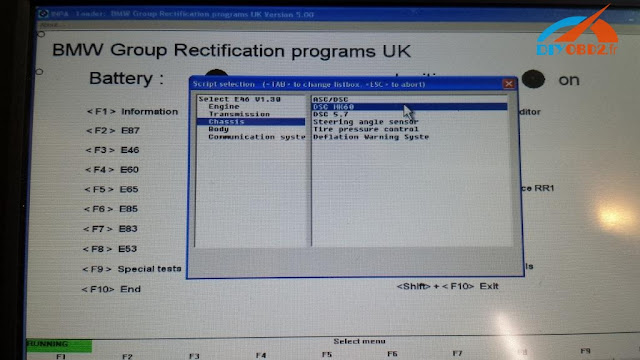
Select vehicle as E46
Select chassis
Select steering angle sensor
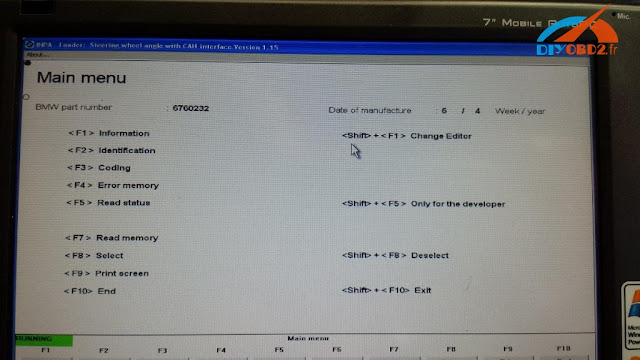
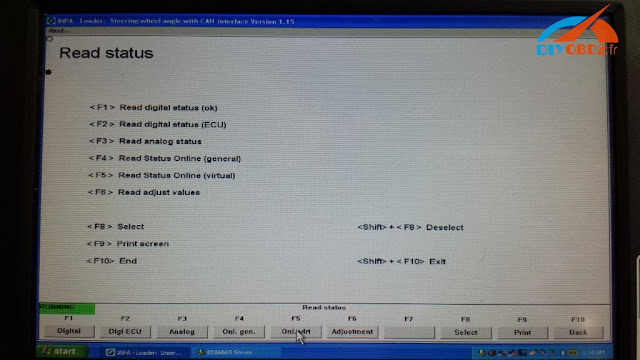
Hit F5 to read status
Hit F4 and the system will show the general status
You will able to view the current steering angle sensor is calibrated to close to zero deg. when the physical steering is pointed straight ahead
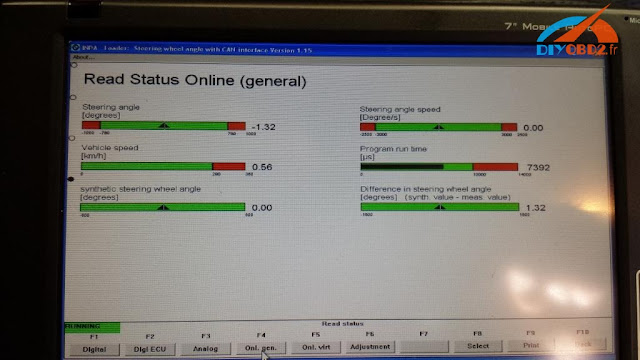
If the steering angle sensor calibration value is not extremely close or exact, you need to reset it.
Go to main menu and select E46 again
Select chassis
Select
DCS MK6
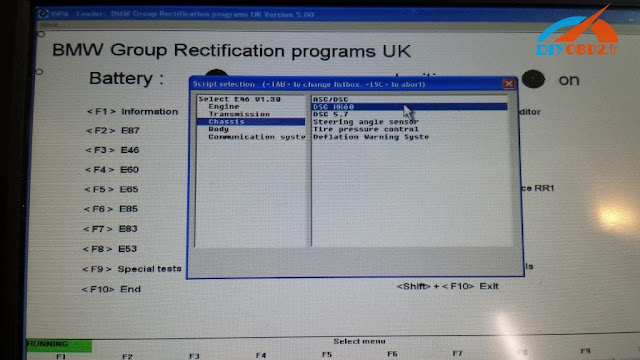
Click SHIFT+F4 buttons at the same, the system will display the compensation routines.
Select chassis
Select steering angle sensor

Hit F5 to read status

Hit F4 and the system will show the general status

You will able to view the current steering angle sensor is calibrated to close to zero deg. when the physical steering is pointed straight ahead

If the steering angle sensor calibration value is not extremely close or exact, you need to reset it.
Go to main menu and select E46 again
Select chassis
Select
DCS MK6

Click SHIFT+F4 buttons at the same, the system will display the compensation routines.
bmw icom a2+b+c diagnostic & programming tool

Avec un ordinateur portable

2016年12月22日星期四
Réinitialiser le capteur d'angle de direction BMW, Tool32 ou INPA?
Voici deux solutions de réinitialisation BMW capteur d'angle de braquage, un à l' aide de BMW ICOMENET Toolset 32 pour BMW Série F, l'autre en utilisant le câble INPA K + DCAN pour BMW Série E.
Pourquoi vous avez besoin de réinitialiser SAS?
Le capteur d'angle de braquage (SAS) est une partie essentielle du système ESC qui mesure l'angle de position du volant et la vitesse du tour.
Lorsque l'alignement des roues se fait ou la direction physique réelle de la direction est fixé à, et dernier étalonnage capteur de l'angle de braquage de est assez différent pour provoquer le DSC (contrôle dynamique de la stabilité) ECU confusion dans certaines conditions.
Ensuite, vous devez réinitialiser le capteur d'angle de braquage de sorte que son droit devant la lecture dans le logiciel correspond à la position droite physique.
-> Pour les voitures de série BMW F:
Solution 1: bmw icom avec outil de capteur d'angle de braquage de 32 réinitialisation
Bmw 320d f30 2005
Bien relié par ENET cable ou émulateur ICOM avec le véhicule
Lancer le lancement Toolset 32 / Tool32:
Sélectionnez "Charger fichier SGBD Group"
Trouvez votre module DSC et cliquez sur "ouvrir", par exemple, un E90 2005 320D est DSC_87.prg)
Dérouler la liste "Jobs" et trouver l'option "lenkwinkel dsc abgleichen", contact et double-cliquez sur l'option. Attendez environ 10 secondes jusqu'à ce que le travail est terminé.
L'angle de braquage est calibré et VIN est adapté à la voiture.
-> Pour BMW Série E:
Solution 2: câble usb K + DCAN avec capteur d'angle de braquage de remise à zéro INPA
bmw e46
Bien connecter k + câble DCAN
ouvert INPA sur l'ordinateur portable
Choisir véhicule E46
Choisir châssis
capteur d'angle Select de direction
Hit F5 pour lire l' état
Hit F4 et le système affiche l'état général
Vous sera en mesure d'afficher le capteur d'angle de braquage actuel est calibré à près de deg zéro.lorsque la direction physique est pointée droit devant
Si la valeur d'étalonnage du capteur d'angle de braquage est pas très proche ou exacte, vous devez le réinitialiser.
Aller au menu principal et sélectionnez E46 nouveau
Sélectionnez châssis
Sélectionnez
DCS MK6
Cliquez SHIFT + touches F4 au même, le système affiche les routines de compensation.

Choisir châssis
capteur d'angle Select de direction
Hit F5 pour lire l' état
Hit F4 et le système affiche l'état général
Vous sera en mesure d'afficher le capteur d'angle de braquage actuel est calibré à près de deg zéro.lorsque la direction physique est pointée droit devant
Si la valeur d'étalonnage du capteur d'angle de braquage est pas très proche ou exacte, vous devez le réinitialiser.
Aller au menu principal et sélectionnez E46 nouveau
Sélectionnez châssis
Sélectionnez
DCS MK6
Cliquez SHIFT + touches F4 au même, le système affiche les routines de compensation.

Click F1 button to reset the steering angle sensor
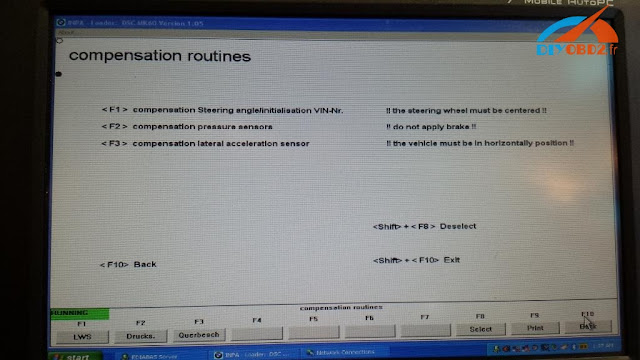
Go back to steering angle sensor menu to view the current status. The calibrated value should go down to zero. The procedure is complete and then you can clear the error codes or do other coding options.

Go back to steering angle sensor menu to view the current status. The calibrated value should go down to zero. The procedure is complete and then you can clear the error codes or do other coding options.
Enjoy!

